Designed, delivered and running.
We deliver outcomes, not technology. Every system is built around the workflows your team already runs — and it stays stable, secure and updated as your business grows.
One reliable system for your whole company.
You get milestone deliveries, build updates, templated contracts and a clear handover — from first meeting to go-live. Below is the full cycle — what you get in each phase, what it costs, and when it happens.
- Whole-company flowchart
- Pain nodes priced in your numbers
- One priced recommendation for what to build first
- One-time payment
- Credits toward the system price if the project starts within 1 month
TimelineOne core meeting with you, a draft in days. Follow-up meetings with you and your team to cover edge cases — the final sheet by end of week two.
- Operations Platform (ERP · CRM) — prospect to payment to handover
- Field Operations System (Field-service SaaS · FSM) — deskless teams, check-ins, photo proof
- Production-Floor Execution (MES · ERP) — batches, quality, traceability on one record
- Manual-Work Automation (RPA · Workflow automation) — scheduled collection, dedup, delivery
- Intelligence Layer (BI) — dashboards and alerts on your own data
- Paid in phases, or with in-house financing options
TimelineMilestone sign-offs through build, then acceptance and go-live on the fixed date.
- Repair clock and a named engineer
- eight hours of small changes a quarter
- Quarterly health report with a logged restore test
- Signed before go-live
- Annual upfront, or quarterly at +5%
- Billing starts month two
TimelineCoverage from go-live day one, then a quarterly rhythm.
Full project cycle. Preparation, weeks 1 to 2: Company Blueprint — whole-company flowchart, pain nodes priced in your numbers, one priced recommendation. Execution, weeks 3 to 14: the five core modules built, accepted and live. Longevity, from week 15 onward: Maintenance & Support. Each phase lists what you get, what it costs, how it is paid and its timeline.
Selected project case studies.
Five builds — different industries, countries and starting points. Each carries the complete picture at reading depth: the need, the setting, the modules and timeline, the system, and what changed when it ran — not the deep specifics. The full report sits behind one link at the end of every case.
Distribution ERP for diesel generator sets
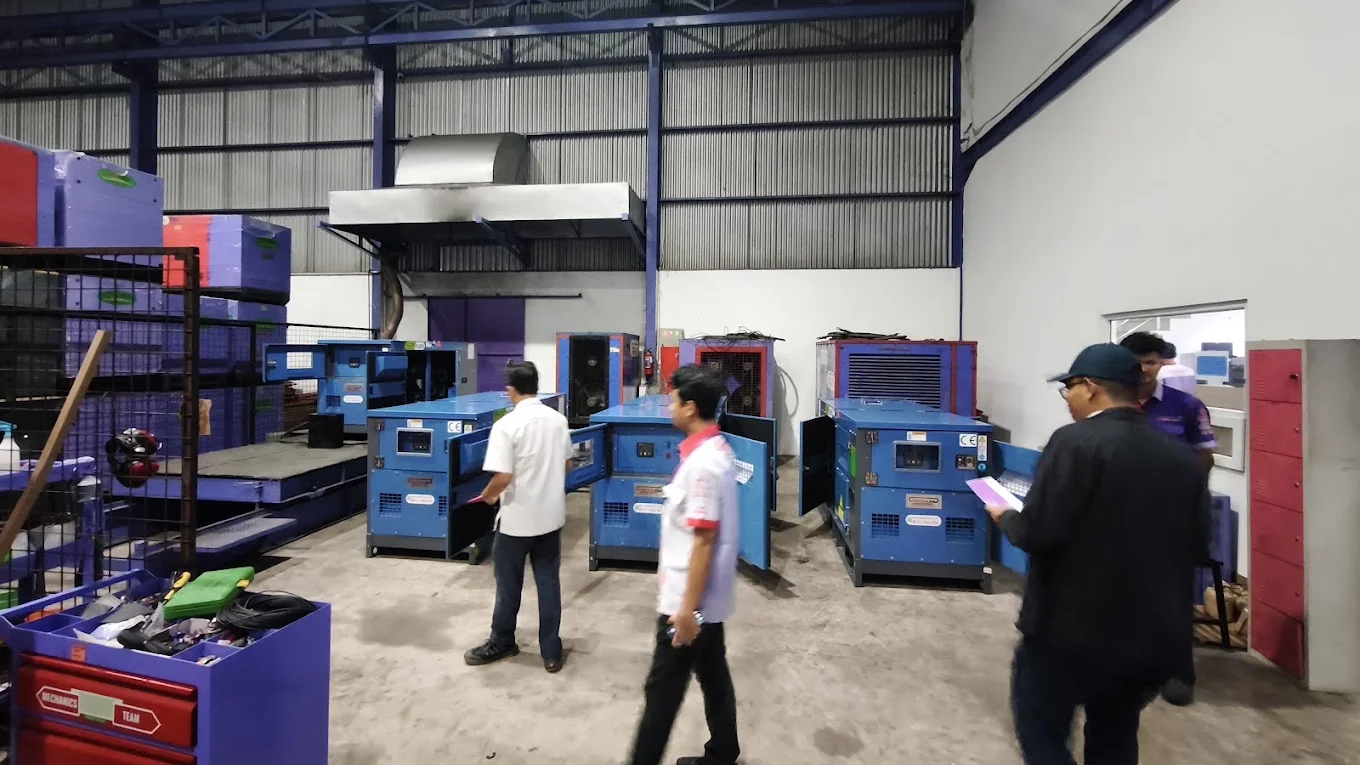
We have all the processes, but my team always needs my confirmation.
The setting
A distributor thirteen years in the market: about 50 staff across six departments, 29,000 customers, and the relationships living in WhatsApp groups and salespeople’s memories. Two legacy systems run in parallel and do not talk to each other.
Modules Included
Operations Platform(ERP · CRM)Covers: Prospect to purchase order on one platform, Dual parallel approvals, Costing with full version history, Close.
- Prospect to purchase order on one platform. Lead warming, a customer track-record screen, and follow-up cycles logged against every account.
- Dual parallel approvals. A work-order letter signed by the Sales Head and a technician request signed by the Service Manager; dispatch stays blocked until both clear. Joint technical surveys file as structured reports routed to the Service Manager only.
- Costing with full version history. Who changed what, when, why — watchable mid-calculation by the Director. Official quotations generate as branded PDFs showing part names only, never part numbers.
- Close. Purchase-order recording under the business rule “PO without payment is not a sale.”
Phased across the 24-week program; four milestone sign-offs.
Field Operations System(Field-service SaaS · FSM)Covers: Every visit starts with a toggle, Jobs reach technicians anonymized.
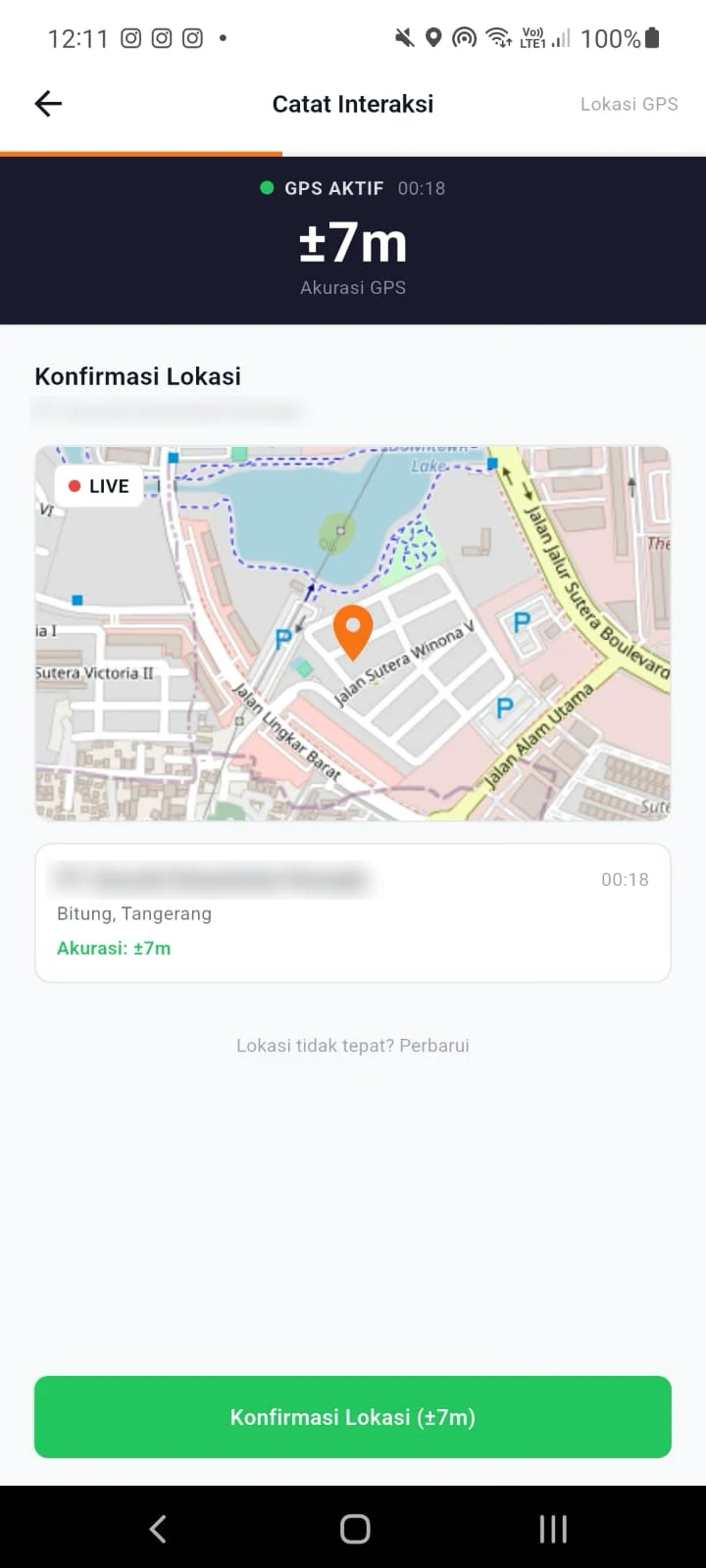
- Every visit starts with a toggle. Sales and technicians start the task in the app; the check-in stamps GPS and time, and follow-ups are logged with location photos — a field record nobody has to retype.
- Jobs reach technicians anonymized. Eight roles under which technicians receive jobs fully anonymized — no customer name, no deal value.
Runs inside the same 24-week program; the field rollout rides the platform’s milestone sign-offs.
Manual-Work Automation(RPA · Workflow automation)Covers: Cold-lead reminder cycles, Back office on agents.
- Cold-lead reminder cycles. Configurable 3/5/7-day cycles with 08:00 notifications; automatic escalation to the Sales Head and Director when a live deal goes quiet.
- Back office on agents. Digital reimbursement and leave approvals run themselves, so routine paperwork stops landing on anyone’s desk.
Delivered alongside the platform inside the same phased program.
Intelligence Layer(BI)Covers: The Director’s screen.
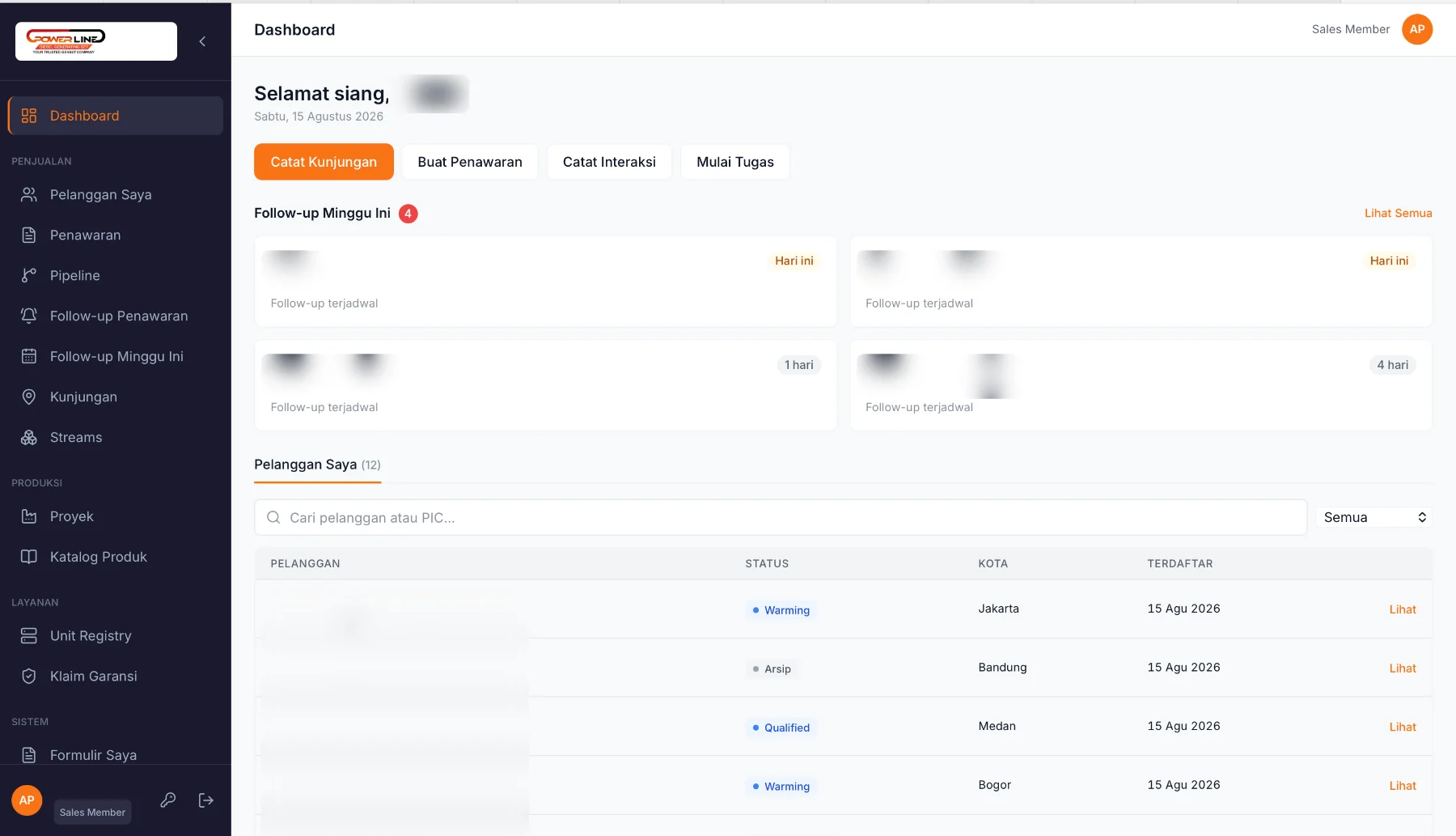
- The Director’s screen. A real-time dashboard: pipeline value, quotations, per-salesperson conversion, pending approvals, receivables and the team map — the day’s operation on one screen, no phone calls needed.
Runs on the same data the team enters; no separate reporting step.
The system
One platform carries the entire pre-sales process, first prospect to purchase order. Around it: a real-time Director’s dashboard (pipeline value, quotations, per-salesperson conversion, pending approvals, receivables, team map), GPS field tracking, and eight roles under which technicians receive jobs fully anonymized — no customer name, no deal value.
The system running
What changes when it runs
The phone stays on the desk. The Director sees pipeline value, field locations and pending approvals on one screen. Customer relationships belong to the company instead of whoever holds the phone. Surveys coordinate with an audit trail. The structure holds from five salespeople to fifty without a system change.
Property sales ERP for residential development
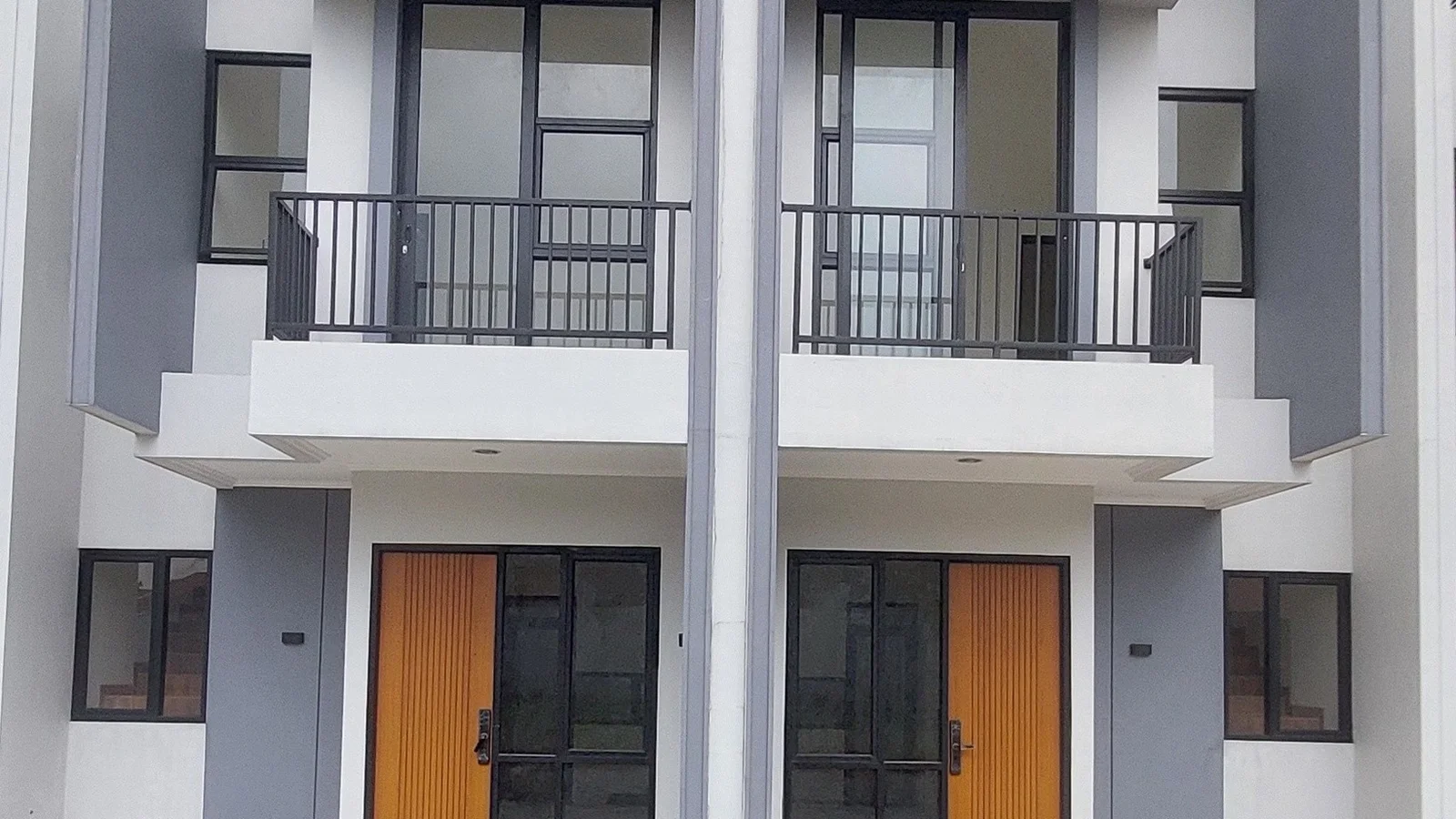
A unit’s true state lives in three people’s inboxes.
The setting
A residential developer marketing a cluster-housing project. The sales operation ran prospect, site visit, booking, payments and installments, unit inventory, handover and post-handover service across fragmentary tools. The goal: one platform for the whole sales team, from first prospect to handover.
Modules Included
Operations Platform(ERP · CRM)Covers: The full sales ladder in one place, What only property needs, Configured, not rebuilt.
- The full sales ladder in one place. Prospect records, site visits, bookings, payment schedules, unit inventory with live state, handover and post-handover service in the same record.
- What only property needs. Booking holds against a unit, installment schedules tied to that unit, and handover with post-handover service carried in the same record as the prospect.
- Configured, not rebuilt. Set up and branded on the studio’s distribution-ERP base.
Configured and branded from the studio’s base; the trial itself is the evaluation.
Field Operations System(Field-service SaaS · FSM)Covers: The sales team works from the same record.
- The sales team works from the same record. Site visits and bookings are logged from the field against the prospect’s record, so the office sees the visit before the team is back.
Same platform, same base — the field team carries it in the pocket.
Intelligence Layer(BI)Covers: Unit inventory, live.
- Unit inventory, live. Every unit’s state — available, booked, sold, handed over — is current on one screen, so sales meetings run on today’s numbers instead of yesterday’s messages.
Live from the platform’s own records — unit states never wait for a report.
The system
Built by configuring and branding the studio’s distribution-ERP base rather than rebuilding. The payment terms are the part worth copying: setup and branding are free, the trial runs from go-live, and post-trial terms are agreed in an addendum before the trial ends — monthly subscription, outright purchase with full IP transfer, or walk away with zero penalty and full data export within 15 business days. All IP stays with the developer until any purchase is paid in full.
The system running
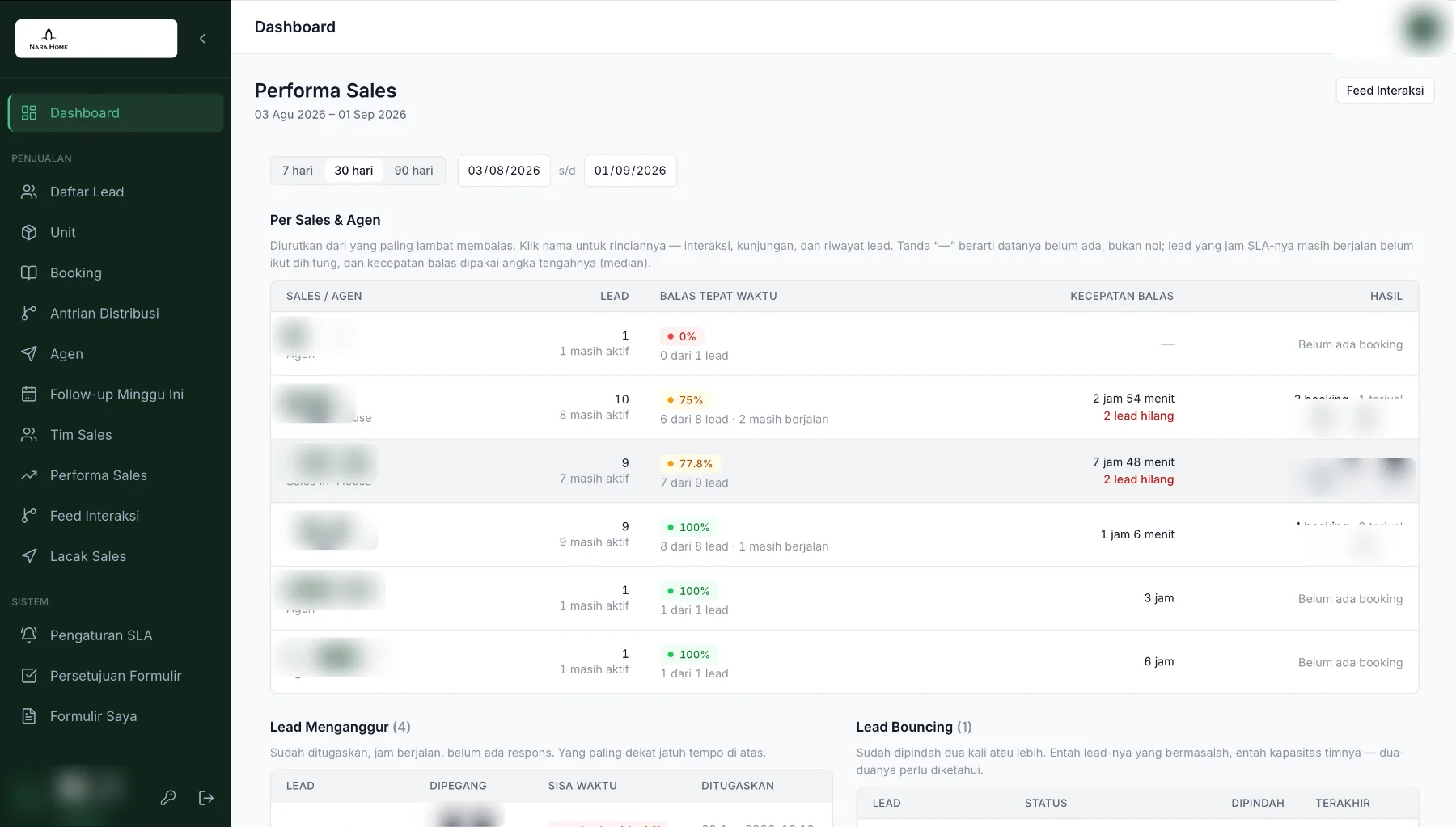
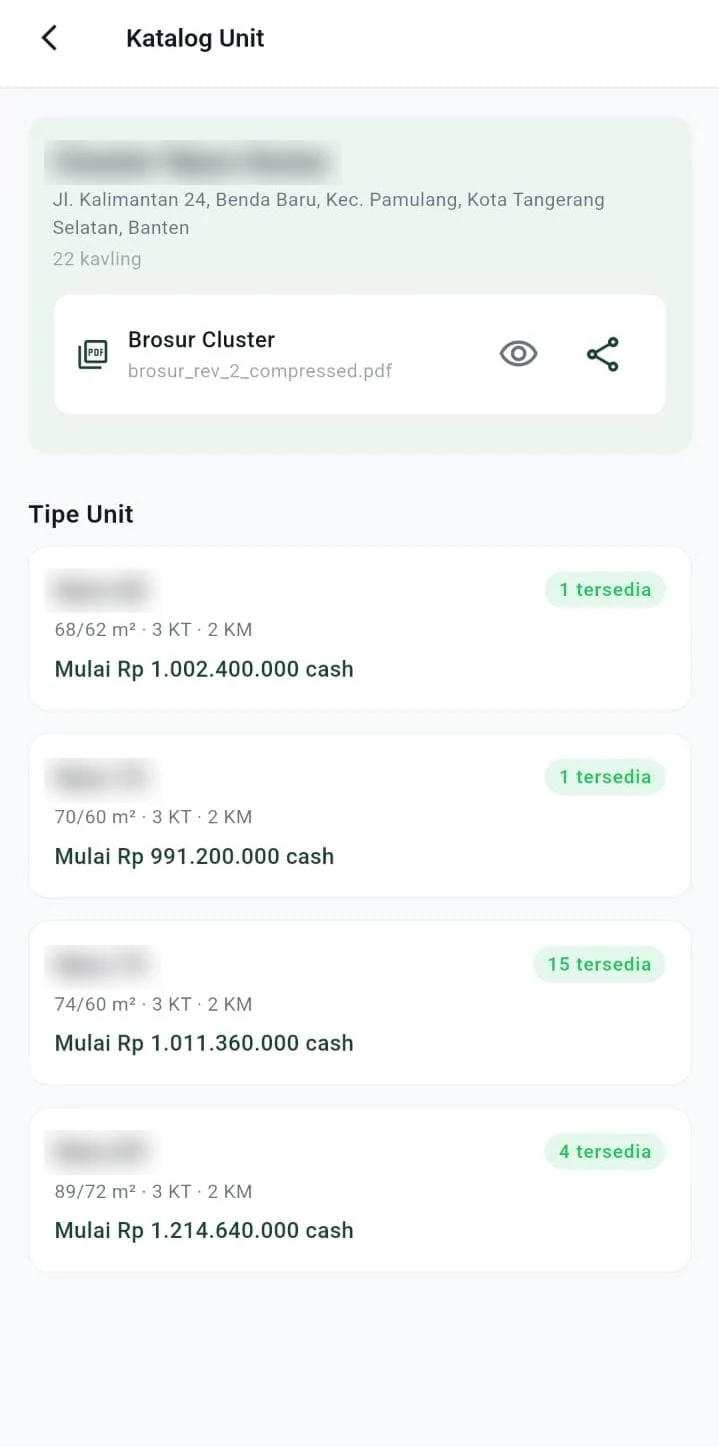
What changes when it runs
The whole ladder sits on one screen, so a unit’s state stops living in inboxes. The system converts on demonstrated value or not at all. The same base configures for a second industry without a rebuild.
Internship listing automation
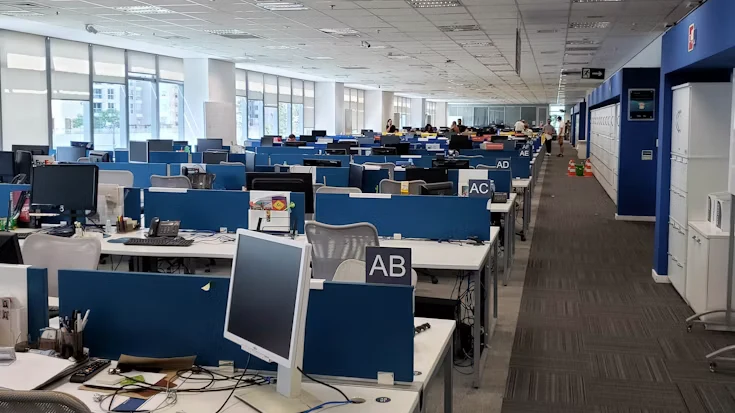
My team spends hours every week collecting the same information before the real work starts.
The setting
An internship-placement firm serving international students, growing its student base without growing headcount at the same rate. The bottleneck was not placement quality. Every week the team opened four job boards by hand, copied listings into spreadsheets, deduplicated manually, standardized company names by eye and classified industries from scratch. Data went stale between checks, and good opportunities expired unseen.
Modules Included
Manual-Work Automation(RPA · Workflow automation)Covers: Sunday-night scrapes across all four sources at once, Standardized and classified, Sources are monitored.
- Sunday-night scrapes across all four sources at once. Deduplication automatic, with per-source tracking.
- Standardized and classified. Company names standardized, industries classified, skills extracted into searchable tags.
- Sources are monitored. If a scrape breaks or returns nothing, the gap is flagged the same day; repairs sit under the monthly support plan.
~5-week build; onboarding session and month-one intensive support included.
Intelligence Layer(BI)Covers: One dashboard, one export, The database stays current.
- One dashboard, one export. Filter by industry, skill, date and source; one-click CSV export. Weekly email digests go out automatically.
- The database stays current. Listings expire after four weeks, so the team always works from what is still live.
Dashboards and digests run on the collection service’s output — no manual step.
The system
One scheduled service replaces the four boards. A manual on-demand trigger covers the odd midweek need. Onboarding, month-one intensive support and repairs under the monthly support plan come standard.
The system running
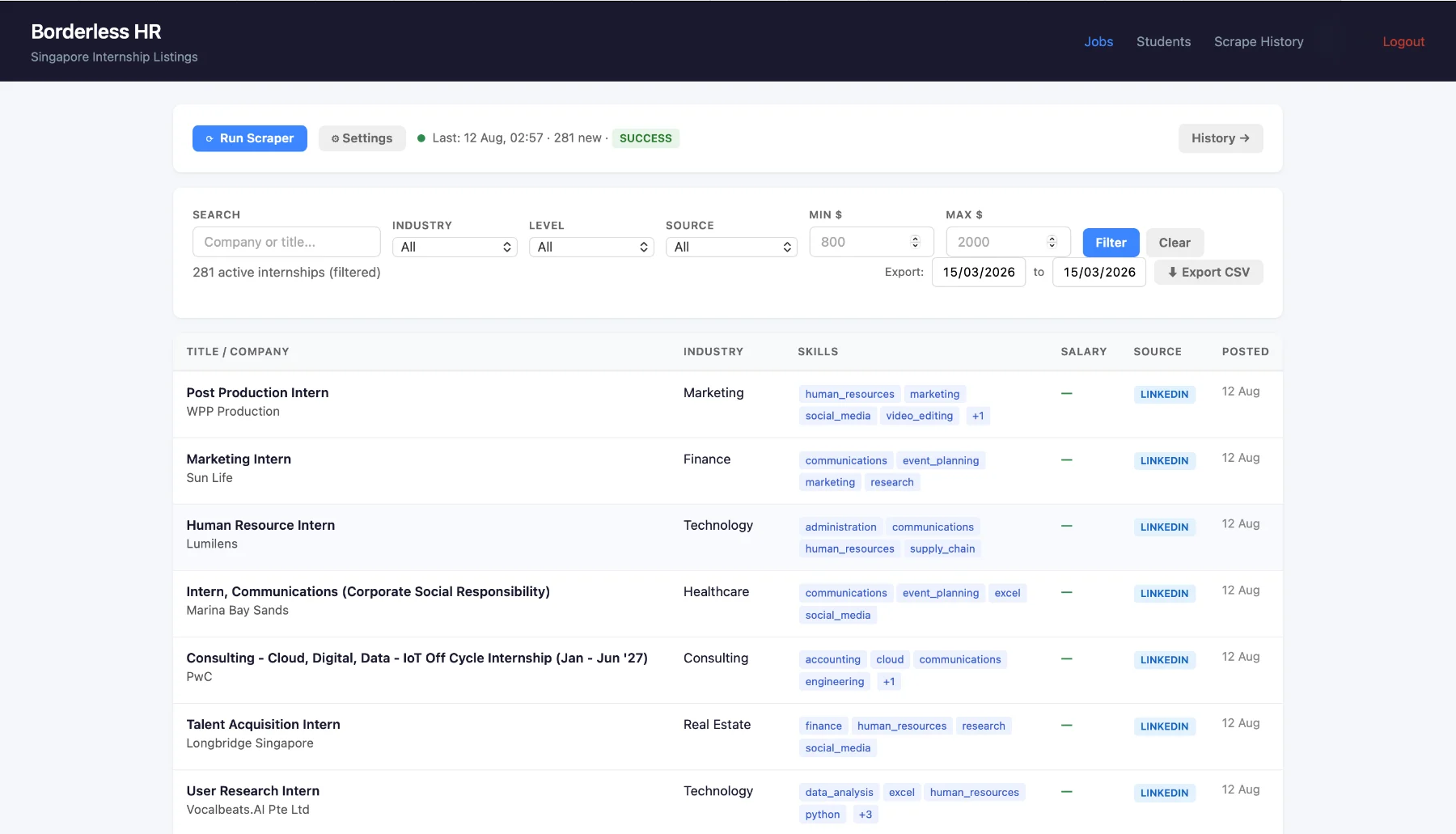
What changes: four job boards become one dashboard — filter, tag, export.
What changes when it runs
Ten hours per recruiter per week come back, redirected from collecting to placing. Four job boards become one dashboard, updated overnight with no manual step. The same team places more students without new hires. Adding sources or students scales without adding human effort.
Cold-chain last-mile delivery ERP
When I’m off-site, I can’t tell whether the work was actually done.
The setting
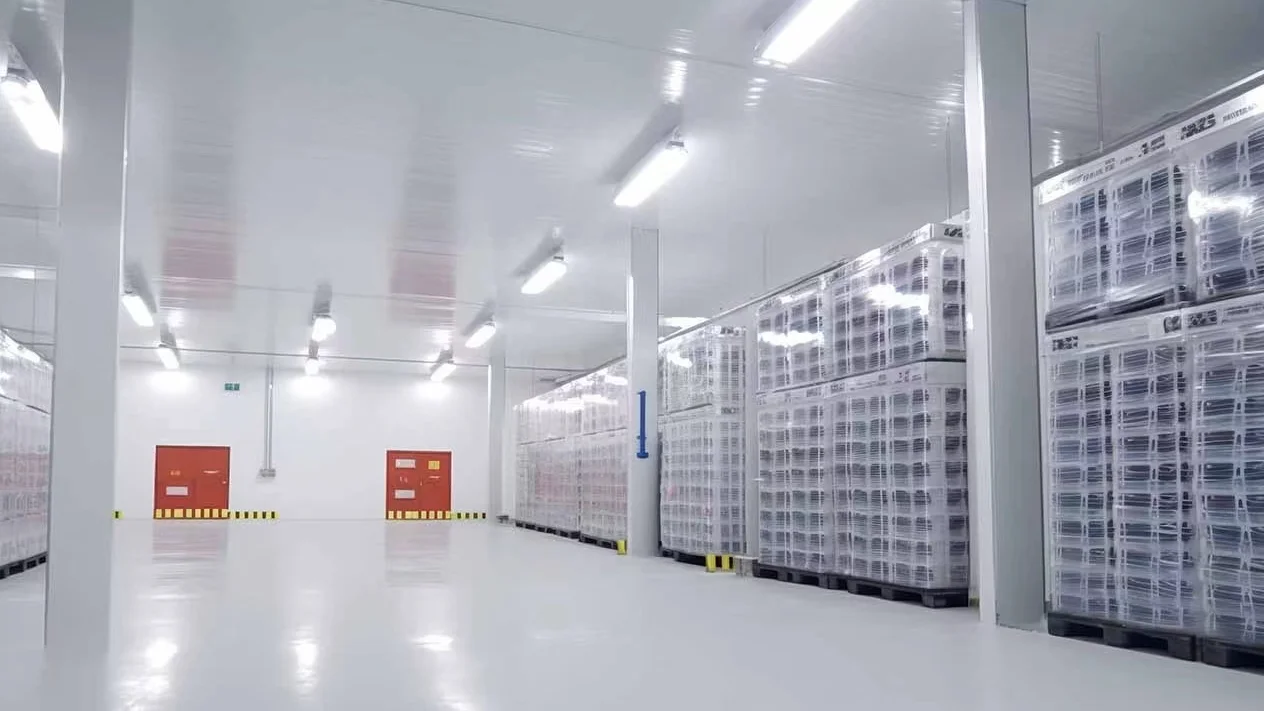
A B2B cold-chain operator moving frozen, chilled and ambient goods on twelve refrigerated motorcycles, with a parent-company backup fleet behind them. The operation worked. Its coordination could not scale: one WhatsApp group carried driver assignment, attendance, proof-of-delivery photos and customer questions in a single unsearchable thread; routes were typed into a maps app address by address every morning; GPS trackers were fitted to every bike but their data sat stranded on the vendor’s separate dashboard.
Modules Included
Operations Platform(ERP · CRM)Covers: Three order channels merge into one queue, Immutable delivery history.
- Three order channels merge into one queue. Manual multi-drop entry with per-drop temperature requirements, a self-service customer portal, and an inbound REST API with per-client field mapping onto whatever the customer already runs.
- Immutable delivery history. The full timestamp chain, exceptions permanently visible, webhook status pushes to API clients.
Web system in 9–10 weeks; API clients onboard per customer.
Field Operations System(Field-service SaaS · FSM)Covers: The evening before, Execution day, Roles stay isolated.
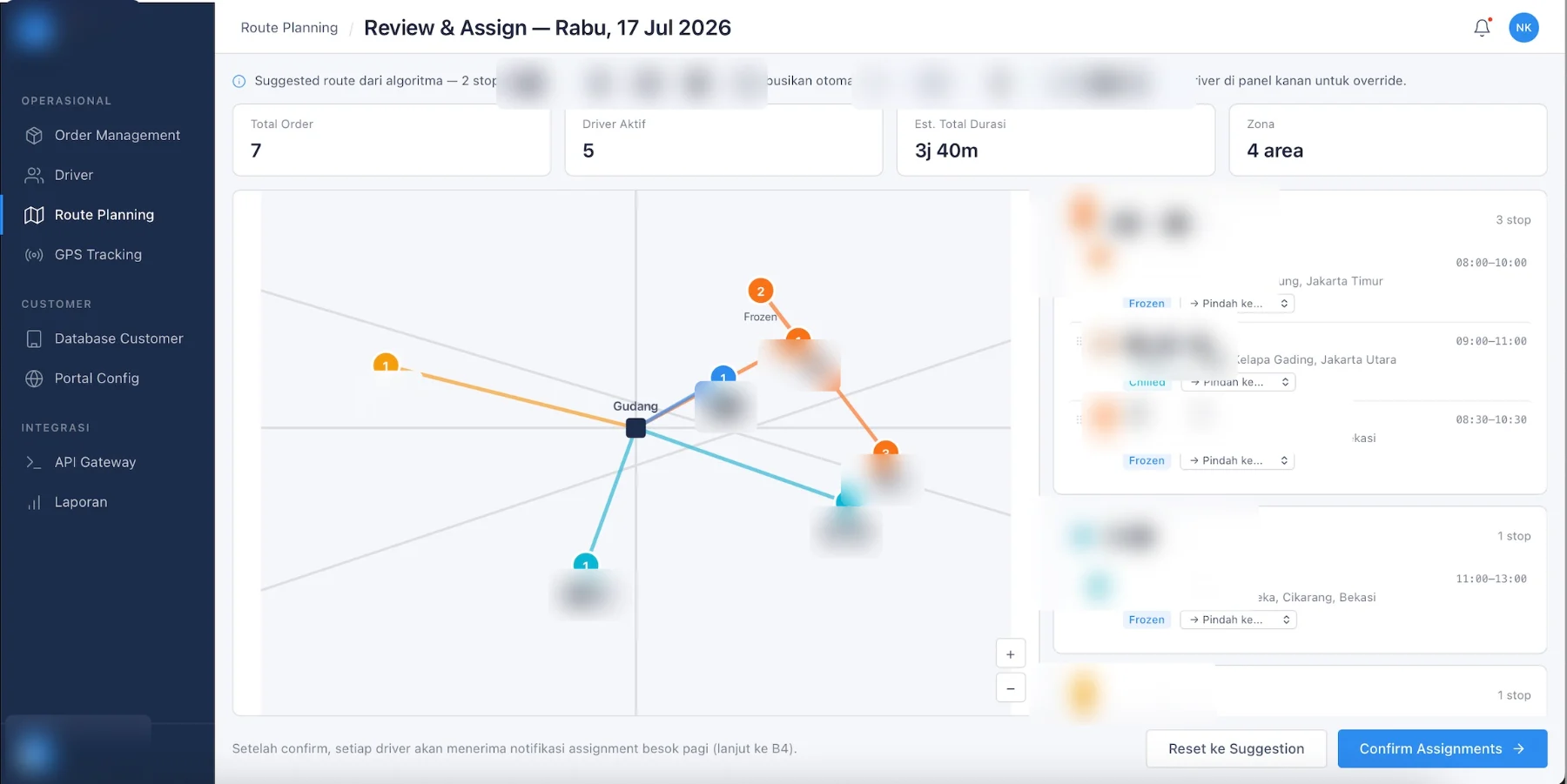
- The evening before. One-tap standby activation from a two-driver rotation; a route engine the dispatcher reviews on a map and drag-overrides before confirming.
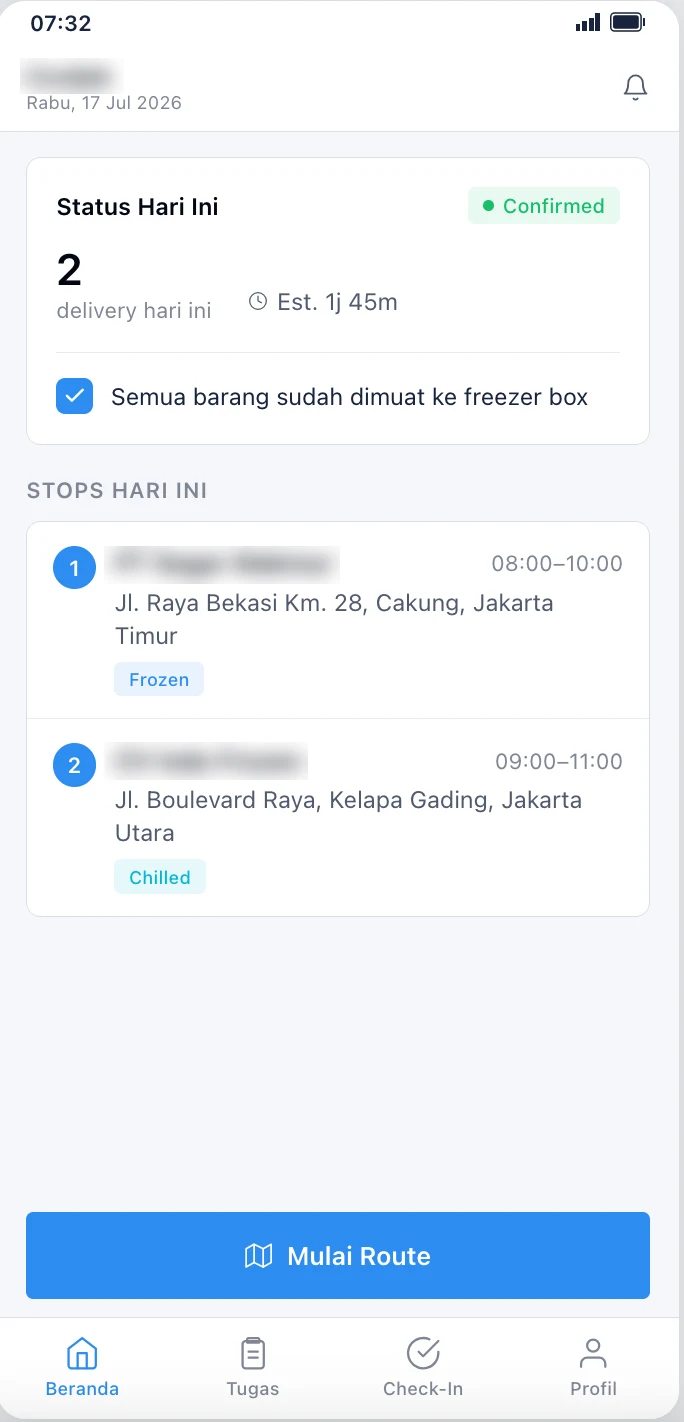
- Execution day. A mandatory freezer-box checklist gates “Start Route”. Proof of delivery is mandatory: no delivery closes without a photo, auto-stamped with timestamp, GPS accuracy, order ID and driver ID.
- Roles stay isolated. A driver never sees order values or customer commercial data; a customer sees driver initials only.
Android app in weeks 11–12; three training sessions and month-one intensive support included.
Manual-Work Automation(RPA · Workflow automation)Covers: The routine chases itself, Status pushes itself.
- The routine chases itself. Automatic 18:00 driver check-in with a 20:00 cutoff and automatic no-show flagging — a delivery-morning no-show surfaces before the phones start ringing.
- Status pushes itself. Webhook status pushes reach API clients on every delivery event; nobody sends them by hand.
Runs on schedule from go-live; nobody operates it.
Intelligence Layer(BI)Covers: One live map of the fleet.
- One live map of the fleet. Live tracking polls the existing vendor GPS every 30 seconds onto one unified map — the GPS data that sat stranded on a vendor’s dashboard now sits next to the orders.
Rides the GPS hardware already fitted to every bike; no new devices.
The system
Eighteen modules in four phases, delivered as the web system first and the Android app alongside it. Customers track two ways: a login-free shareable link that expires 24 hours after delivery, or the portal with permanent history. Delivery includes three training sessions, month-one intensive support, and the maintenance repair clock: priority-one bugs get a response within four working hours and a fix started the next day.
The system running
What changes when it runs
One dashboard replaces the group chat, the maps app and the vendor’s GPS portal. Route planning becomes a review-and-adjust task instead of a morning of typing. Delivery photos attach to orders and are reachable by the customer directly. B2B customers place orders from their own ERP systems through the inbound API, which is what enterprise accounts usually require before they sign. The next city onboards on the same platform — configuration, not construction.
Industrial-group digitalization for a biochemical group
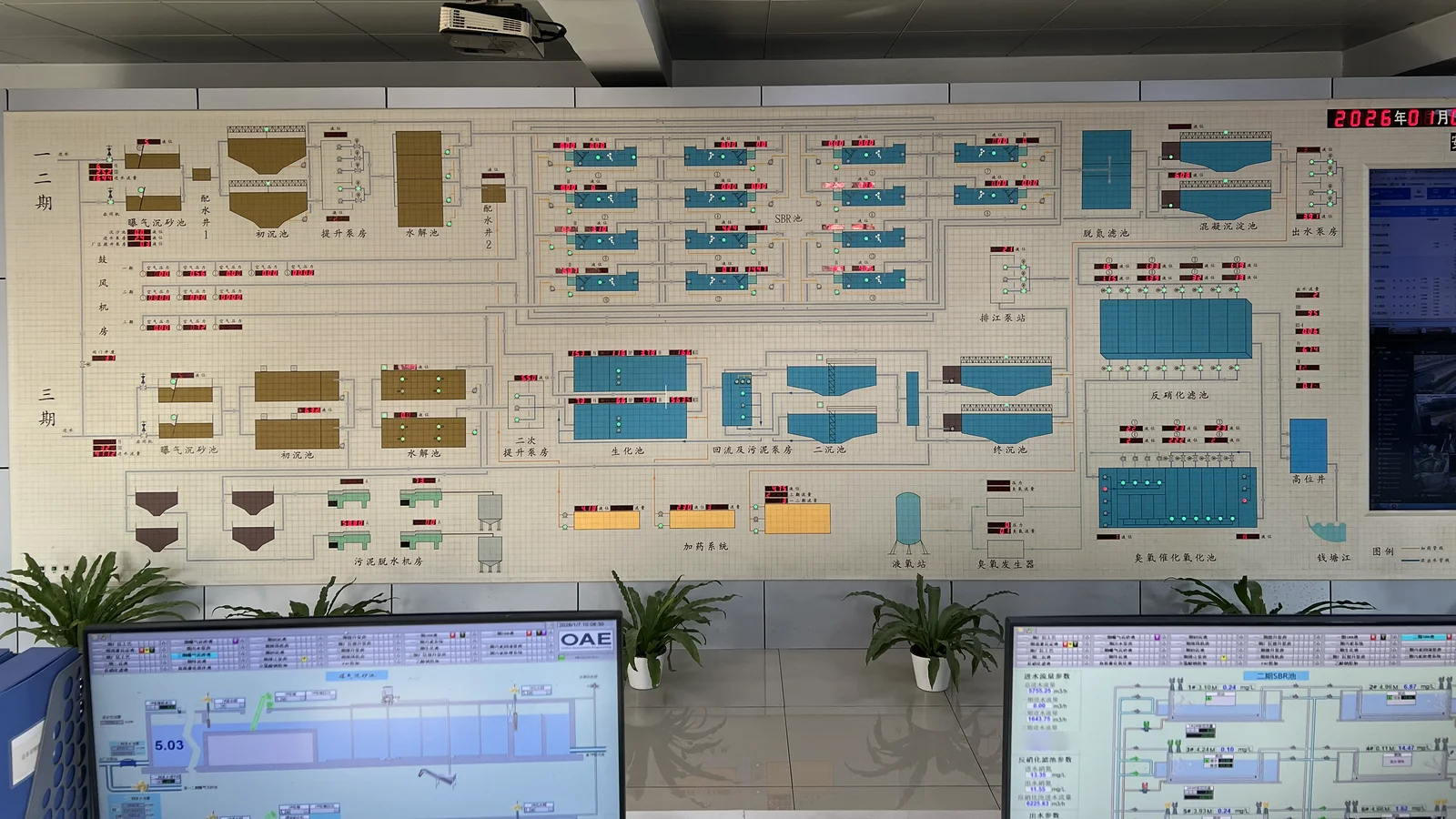
Every plant keeps its own numbers, and the group decides on yesterday’s data.
The setting
A Chinese biochemical group operating 24 facilities on manual processes: the labor-heavy operation where digitalization has obvious, defensible value and no internal team to build it. Labor cost, error cost and compliance cost are all quantifiable per facility, which makes the economics legible to a CFO before anything is signed.
Modules Included
Production-Floor Execution(MES · ERP)Covers: A priced single-site pilot, The savings model, in the open, Compliance digitalized.
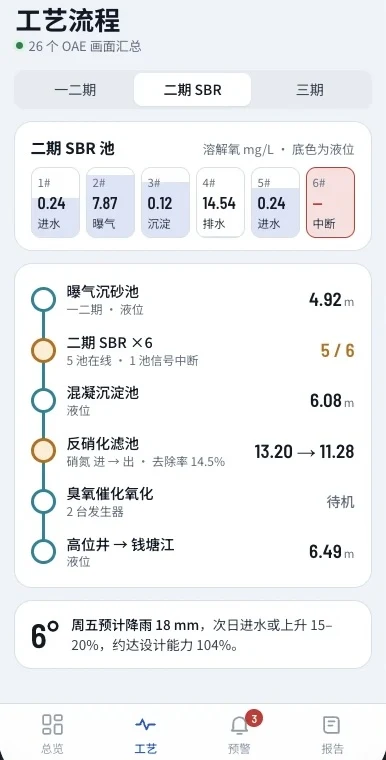
- A priced single-site pilot. Real scope, one facility, one deliverable — designed so the savings case lands on one facility’s books before any rollout decision.
- The savings model, in the open. Per-facility labor displacement, process mapping, and a savings narrative a CFO can check line by line. The modeled 24-facility rollout projects a high seven-figure RMB amount per year in labor savings across the group. It is a model, not a field result.
- Compliance digitalized. Process mapping and compliance records digitalized per facility, on the same pattern the pilot proves.
Pilot first: priced, scoped and staged before any rollout commitment.
Manual-Work Automation(RPA · Workflow automation)Covers: Manual returns, collected on a schedule.
- Manual returns, collected on a schedule. What arrives today by hand — production counts, compliance paperwork — is collected, deduplicated and filed in the system on a schedule instead of in folders.
Scheduled collection lands with the pilot’s first facility.
Intelligence Layer(BI)Covers: The group layer aggregates.
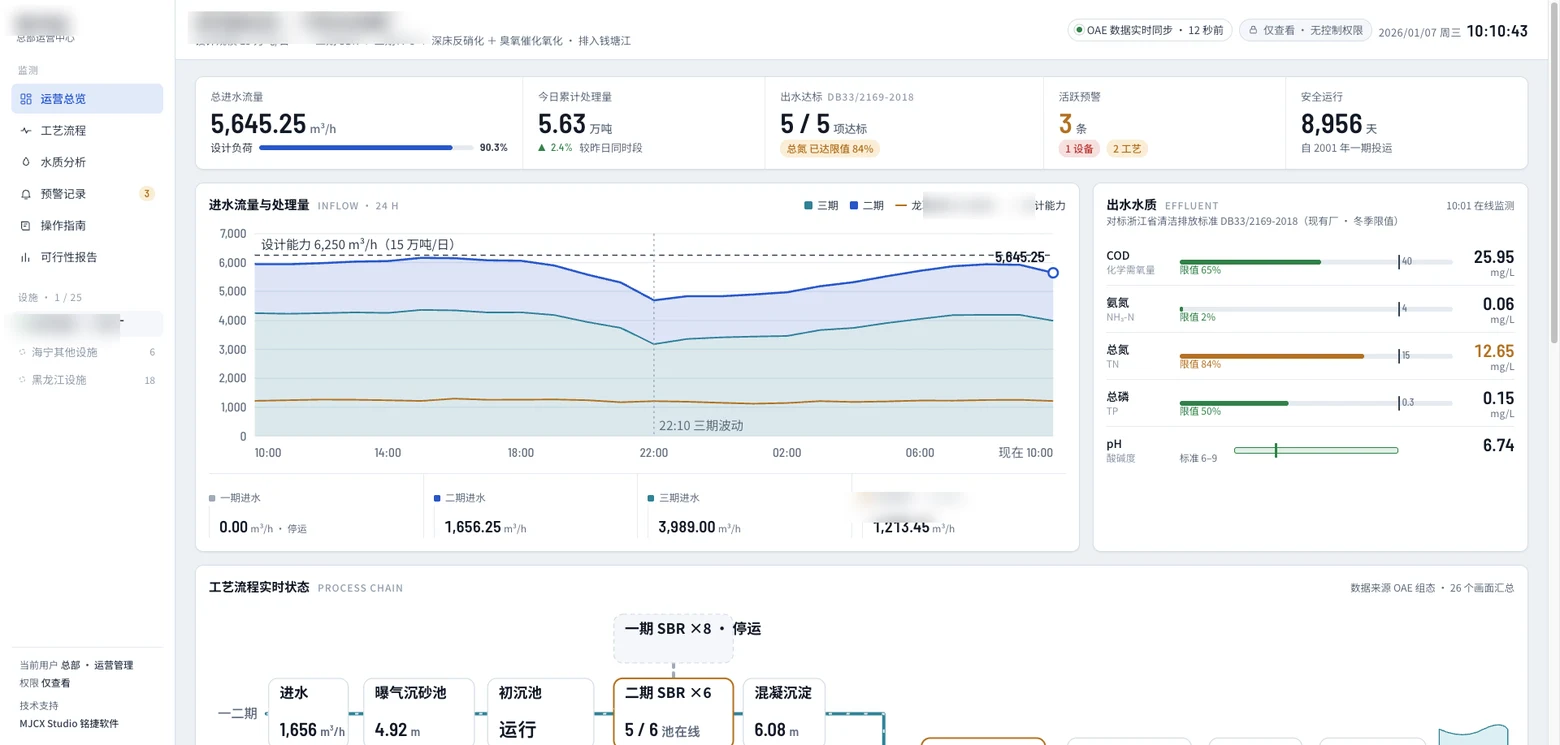
- The group layer aggregates. Numbers roll up across facilities so group decisions rest on current data instead of yesterday’s.
Rollout staging decided on the pilot’s evidence.
The system
A priced single-site pilot: real scope, one facility, one deliverable — designed so the savings case lands on one facility’s books before any rollout decision. Each facility digitalizes on the same pattern: process mapping, labor displacement per facility, compliance digitalized.
The system running
What changes when it runs
The pilot proves the labor-savings thesis on one facility’s books, and the group scales on evidence instead of persuasion. Payback is modeled in plain commercial terms from day one — numbers you can check against your own payroll.
How to know what you need.
Book the Company Blueprint: two weeks with your whole company on one sheet — what to build, how much, and how long — and one priced recommendation, kept either way. It is the fastest way to find out which of the five modules above you should build first.
FAQ
Why can’t I just use AI to build it?
Short answer: You can, we use AI heavily in our own builds. Our operational efficiency becomes your cost efficiency so we can focus on delivering outcomes instead of payable hours. But the devil’s in the details.
AI is like a machine in your plant. Producing your final product takes multiple machines on a production line or cycle, plus your team’s operational expertise to deliver product quality, consistency and after sales service. What makes it difficult for you to just use AI to build, is the same thing that makes it difficult for anyone else to just use your production setup to deliver what you deliver.
Why can’t I use an off-the-shelf ERP — or our own coders and freelancers?
Short answer: You can. It all depends on what outcome you want to achieve.
Here’s a simple comparison of what you get:
| Legacy solution providers | You buy a solution that gives you a new job desk, and charges you up to RMB 6,000/day development cost for customization |
|---|---|
| Other custom software/systems companies | You bring a fixed spec sheet for one industry or use-case, give up ownership of the system, skip flexible financing, and accept maintenance that often runs 15–20% a year, billed by hours or days instead of outcomes |
| In-house coders | Best access, success rate and customizations — if you have the budget for a full team of capabilities and relevant dependencies |
| Freelancers | Best value for money if you find a golden goose. Most go like: takes payment, goes silent, no source code, no docs, no handover |
MJCX Studio serves clients who fit exactly this profile:
- Needs 1 custom system to cover different workflows, systems, operation habits
- Needs clarity in what to build and ongoing support to ensure the system grows with the business
- Needs system ownership, favorable financing terms, efficient build and maintenance costs
What happens if we have a dispute or legal issue?
Short answer: Prevention is better than cure — agreements and contracts that provide clarity and expectations management, instead of “just a good deal to get started.”
Most disputes come down to six things: payment terms, delivery obligations, IP and data ownership, handover, after-sales service, and scope changes. When you work with us, we jointly sign eight-plus agreements — from NDA to maintenance annex — following the milestones and payment terms we agree on. We also provide quarterly health reports and usage statistics to help you understand your business more and how it is growing or needs improvement. This way there is always a paper trail that makes disputes clear and simple to resolve.
You’re a new company — can you deliver, and will you be here next year?
Short answer: Yes — on both counts.
Our team has worked at Huawei, Tencent, A-Star, CP Group and SCG, with backgrounds from Zhejiang University & National University of Singapore. We have also worked with government agencies and Chinese state-owned enterprises through our previous climate tech startup. For our recent deliveries, please refer to the Projects page or talk to us about your specific project needs.
We put our founders’ reputation on the line for everything we work on together because we want to build the future of how SMEs operate, together with clients like you. We believe AI has created a larger and more willing market, because clients can visualize and understand the benefits of a system better, as well as making the cost of scoping, building and maintaining a custom system more achievable. And because we stay small on purpose, we choose clients as carefully as they choose us — every engagement is someone who believed in us early, and we treat it that way.
What happens after go-live?
Short answer: Everything is signed and confirmed before the start of the build. You can choose to run the system yourself or with us.
If you decide to continue working with us, maintenance is 10% of the build value a year (RMB 15,000 floor), signed before you go live. Coverage starts the day you launch; billing starts month two — the first month is part of the build. Every quarter includes eight hours of small changes, a health report with a logged restore test, and the repair clock: priority-one issues get a response within four working hours and a fix started the next day — miss the clock twice in a quarter and the next month is free. Or run it yourself: full IP transfers at final payment, documentation transfers with the system, your data was always yours and stays exportable. And if payments ever lapse, the system pauses to read-only until the account settles — your data is never touched.
Tell us which one is yours.
One short call at a time that suits you, or forward this to whoever runs the operation with you.